In brief
- OpenAI retires custom GPTs on 11 December 2026, on all ChatGPT plans; only FedRAMP workspaces and workspaces with an approved deferral have until 28 February 2027. After that, a GPT and its page are no longer accessible; earlier conversations remain.
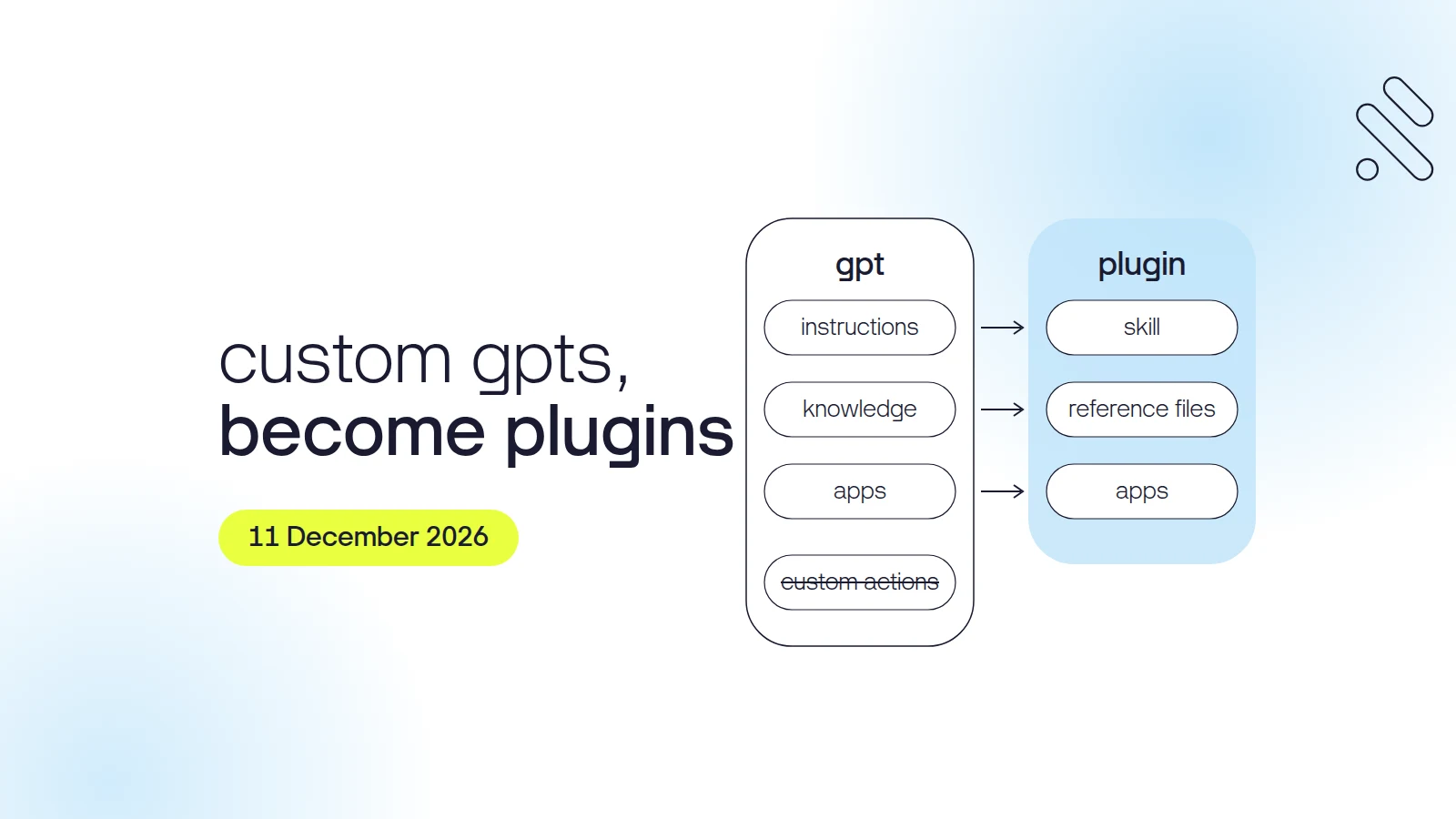
- The successor is a plugin. When you migrate, a GPT's instructions become a skill and its knowledge files and connected apps carry over, but custom actions do not: you replace them with an existing app or rebuild them, sometimes as your own MCP server.
- Where plugins process data and whether they support Dutch is not stated in OpenAI's FAQ. Whether a plugin works depends, according to OpenAI, on your plan, workspace, role and region.

OpenAI retires custom GPTs on 11 December 2026, on all ChatGPT plans. Creators migrate their GPT to a plugin. For FedRAMP workspaces and Enterprise workspaces with an approved deferral, the date is 28 February 2027. That is in OpenAI's FAQ on retiring GPTs, updated in the week of 22 November.
What changes
Until 11 December a GPT keeps working. After that, the GPT and its page are no longer accessible. Your conversations with a GPT stay in your history. If you created a GPT, you select Migrate to plugin under My GPTs once the option is available for your account. OpenAI notes that this does not happen for every account on the same day.
| Part of the GPT | In the plugin |
|---|---|
| Instructions | Become a skill |
| Knowledge files | Become reference files |
| Connected apps | Stay apps |
| Custom actions | Do not carry over; you replace them with an existing app or rebuild the integration |
| Selected model | Does not carry over; in Enterprise the workspace defaults apply |
Migration uses the latest published version; drafts do not carry over. Afterwards the original GPT stays usable until the retirement date, but you can no longer edit or delete it. The new plugin starts private: people who used the GPT do not get access automatically. According to OpenAI, standard Chat, including Instant, does not currently run scripts bundled in a plugin. If you used a GPT for ongoing work, such as writing or research, OpenAI suggests a project instead. Custom actions, sharing settings and earlier conversations do not carry over to a project.
For Enterprise the FAQ lists earlier dates. Admins were notified on 11 September, and since 26 October the affected Enterprise workspaces can no longer create new GPTs, except FedRAMP workspaces. Existing GPTs remain editable until they are migrated. The ChatGPT Admin plugin migrates GPTs in bulk; retrieving the full GPT inventory of a workspace currently requires an Owner. Using a migrated GPT without apps in Instant Chat has no incremental cost there. Creating or editing plugins through a conversation uses Work or Codex, and actions in Work consume credits.
What this means in the Netherlands and the EU
- Availability: according to OpenAI the change applies to all plans; the FAQ does not mention the Netherlands separately. Whether a plugin can be installed and used depends, according to the page on plugins, on your plan, workspace, role and region.
- Data processing: the FAQ does not say where plugins process data. OpenAI does say that apps in a plugin require their own access and approvals, and that installing a plugin gives no additional permissions to data in the connected service.
- Price: the FAQ mentions no price for migrating. Only for Enterprise does it say what usage costs: nothing extra without apps in Instant Chat, while actions in Work consume credits.
- Language: the FAQ says nothing about Dutch.
In practice a custom action is often the integration with an internal system: a case management system, a knowledge base, a planning tool. If no existing app does the same, OpenAI says you may need to rebuild the integration as your own MCP server. What that involves in permissions, logging and maintenance is covered in AI agents in production. We build such integrations ourselves as part of custom AI software.
What you can do now
- 1List the GPTs your organisation relies on, who maintains them and which use a custom action. Those take the most time.
- 2Start with the GPTs without custom actions; they are quickest to move. Test each plugin with a few familiar prompts and at least one harder case, as OpenAI recommends, and only then share it with the original users.
- 3For each custom action, decide who rebuilds the integration and who reviews the permissions. Plan for 11 December: 28 February 2027 applies only to FedRAMP and approved deferrals, and is then stated in your workspace notice.
Frequently asked questions
When do custom GPTs stop working in ChatGPT?
On 11 December 2026, on all ChatGPT plans. FedRAMP workspaces and Enterprise workspaces with an approved deferral have until 28 February 2027. After that date, GPTs and their pages are no longer accessible. Earlier conversations with a GPT stay in your history, without you having to do anything.
What happens to a custom action when I migrate my GPT to a plugin?
It does not carry over. OpenAI moves the instructions, knowledge files and connected apps into the plugin, but a custom action only works again once you set up a replacement: an existing app, or an integration you rebuild. According to OpenAI that may require your own MCP server and technical setup. Test the new integration separately and do not assume it can do everything the old one did.
Do plugins in ChatGPT work in the Netherlands?
According to OpenAI the migration applies to all plans, so also to organisations in the Netherlands. Whether you can install and use a particular plugin depends, according to OpenAI, on your plan, workspace, role and region. Where plugins process data and whether they support Dutch is not stated in OpenAI's FAQ.